Ever scrolled past one of those “custom dot art” ads on social media and thought, “That’s cool… but I could totally build that myself”?
Circleify is exactly that moment turned into code.
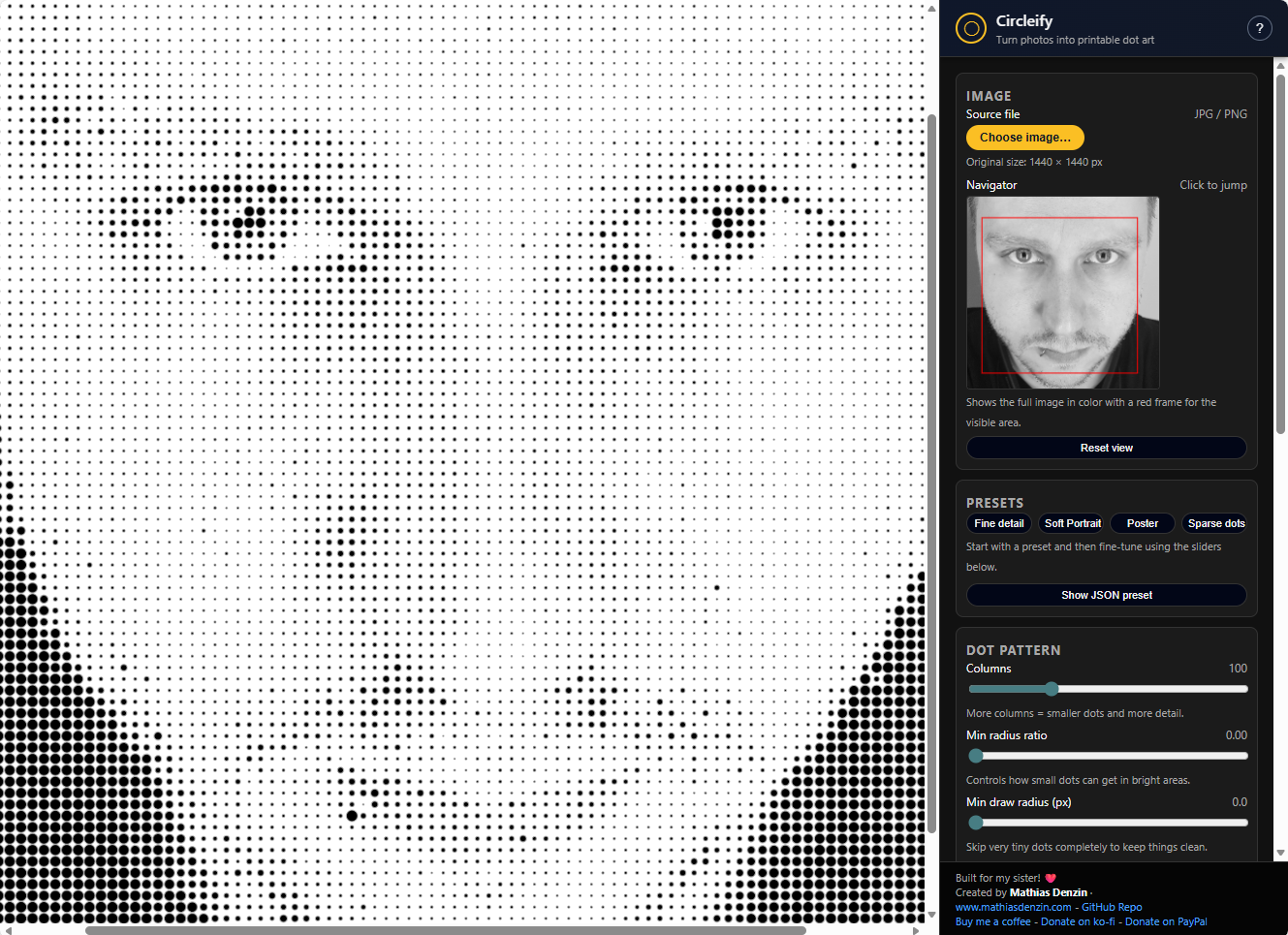
It’s a tiny, single-page web app that converts any photo into a grid of circles – darker areas become larger dots, lighter areas shrink down – creating a clean, printable halftone-style artwork. No signup, no upload, no server. Just you, your browser, and a lot of circles.
What is Circleify?
Circleify is a browser-based image-to-dots tool built with p5.js. You load a JPG or PNG from your device, tweak a few sliders, and watch your image transform into a field of circles that you can download as a high-resolution PNG.
Because everything runs locally in your browser:
- Your image never leaves your machine.
- There’s no backend, no database, nothing to “send your photo to.”
- It works great for privacy-conscious users and quick experiments.
It’s especially suited for:
- DIY posters and wall art
- Coloring pages for kids
- Dot-based planning for bead art, LEGO mosaics, or other grid-based crafts
- Designers and developers who love generative, parameter-driven visuals
How Circleify Works (Conceptually)
At its core, Circleify does something simple but powerful:
- Load an image into a p5.js canvas.
- Sample the brightness of the image in a grid.
- Draw one circle per grid cell, mapping brightness to circle size.
- Darker pixel → bigger circle
- Lighter pixel → smaller circle
This runs inside the standard p5.js lifecycle:
setup()initializes the canvas, UI hookups, and state.draw()handles the rendering loop – reading pixel data, calculating circle sizes, and drawing them.- Handlers like
mouseWheel(),mouseDragged(), and navigator logic keep the experience interactive and smooth.
The end result: a flexible halftone engine that you can shape to your liking with sliders and toggles.
Key Features
Circleify has grown into more than just “image + circles.” It includes a bunch of thoughtful tools to make the workflow fun and practical.
1. Simple, focused start screen
When you open the app, you’re not bombarded with options. You get:
- A clean intro
- A clear “Choose image…” button
- No confusing menus or “advanced” mode
You select a JPG or PNG from your device, and you’re in.
2. Zoom, pan, and navigate like a pro
Once your image is loaded, you’re not locked into a static preview. Circleify gives you:
- Zoom with the mouse wheel – zooming is centered around your cursor, which feels natural.
- Pan with click-and-drag – grab the canvas and move around.
- A mini navigator:
- A small color preview of the whole image
- A red rectangle showing which part you’re currently viewing
- Click inside the navigator to jump instantly to a region
Under the hood, functions like updateNavigator() and updateCanvasCSSZoom() keep all of this in sync, so the dots, zoom level, and navigator rectangle all behave correctly together.
3. Fine-grained dot controls
This is where the magic happens. Circleify exposes the main knobs of the dot grid so you can turn a noisy photo into a clean, printable poster:
- Columns
Controls how many dots span the width of your image.- Low value → big dots, abstract look
- High value → more detail, but heavier computation
- Min radius ratio
Controls how tiny dots can get in bright areas. Push it higher if you want even bright areas to still show visible dots. - Min draw radius
Dots smaller than this threshold are skipped entirely. This is great for:- Reducing clutter
- Getting clean prints with less “dust” in bright regions
- Gap
Adds extra spacing between dots. A higher gap gives more white space and a looser feel. - Jitter
Introduces a slight random offset for each dot.- Off → geometric, clean-grid look
- On → more organic, hand-made feel
4. Tone and color controls
Before the dot grid is drawn, Circleify lets you nudge the image’s brightness and contrast. This gives you much more control over the final look:
- Brightness & Contrast sliders
- Brighten a dark image so the dots don’t go full-black everywhere.
- Boost contrast to emphasize shapes and edges.
- Color modes
You can switch between:- Monochrome – black dots, timeless and print-friendly
- Simple palette – a small curated set (warm, cool, CMYK-ish, blue-ish), where brightness gets mapped across palette colors
The color logic lives in the app’s main script, so it’s easy to extend if you want your own palette.
5. Presets and JSON-based workflows
Circleify isn’t just visual; it’s also designed for repeatable workflows.
- Preset buttons
You can click a preset to immediately load a set of parameters (columns, radii, gap, brightness, contrast, color mode, etc.). This makes it easy to:- Switch between “print-ready” and “sketch” looks
- Use known-good configurations for different types of images
- Live JSON preset panel
There’s a “Show JSON preset” panel that reflects your current settings in JSON form. From there you can:- Copy the JSON into notes or a project
- Paste JSON back in and apply it
- Share presets with others
Circleify keeps the UI controls and the JSON panel synchronized, so you’re never guessing what’s active.
6. High-resolution export
What you see on screen is tuned for interactivity, but the final output is made for printing:
- “Download PNG (full resolution)”
This uses p5.js’ssaveCanvasto export a PNG that matches your original image dimensions, not just the on-screen preview size.
That means you can:
- Load a large photo
- Tweak at a comfortable zoom level
- Export a PNG suitable for posters, prints, or further editing in design tools
For Developers: A Quick Peek Under the Hood
If you’re a developer (or just curious), Circleify is intentionally simple to explore:
- It’s a single-page app:
index.html– markup and UI layoutcss/style.css– layout and stylingjs/dot.js– the main application logicjs/p5.min.js– the p5.js runtime
A few entry points in the code:
setup()– initialization, UI binding, and canvas creationdraw()– the main rendering loop that calculates and draws the dotsmouseWheel()/ drag handlers – zoom and pan behaviorupdateNavigator()– keeps the mini-map and red rectangle in syncupdateCanvasCSSZoom()– adjusts display scaling without breaking coordinate math
If you want to:
- Add keyboard shortcuts
- Introduce new color modes
- Provide alternative export formats
…you’ll spend most of your time inside js/dot.js and a bit in index.html.
Performance Notes
Dot art can get heavy if you push it too far, but Circleify tries to stay responsive:
- Columns scale linearly – doubling columns roughly doubles the work.
- For huge images, it’s often best to:
- Start with fewer columns for quick tweaking
- Then increase columns or downscale your original if needed
- The app uses
noSmooth()when sampling pixels to keep the math fast and predictable.
On a modern browser, Circleify runs comfortably for typical photo sizes and reasonable column counts.
Why Circleify Exists
Circleify grew out of a simple idea: those commercial “we’ll turn your photo into a dot-grid coloring page” services are neat—but you can do that yourself, for free, in a browser.
It’s built for:
- People who like to tinker with visuals instead of accepting a one-click filter
- Parents and teachers who want custom coloring pages (family photos, pets, favorite toys)
- Makers who plan dot-based projects like mosaics, pegboards, or bead art
- Developers who want a readable, hackable example of a small p5.js app with real-world UI
Try It, Hack It, Support It
If you want to:
- Play with Circleify – open the live demo in your browser and drop in a photo.
- Read or modify the code – check out the GitHub repo (you can fork it, open issues, or send pull requests).
- Support the project – you can buy me a coffee or send a small donation via PayPal or Ko-Fi.
Circleify is MIT-licensed, so you’re free to learn from it, remix it, and integrate the ideas into your own tools.
If you’ve ever wanted to turn your photos into dot art—whether for a wall poster, a coloring page for your kids, or just for the joy of watching patterns emerge—Circleify gives you a simple, transparent, browser-based way to do it. No magic, no black box, just circles, sliders, and a bit of math.